Understanding KV Cache
While talking about large language models, we often focus on how a model writes code, summarizes documents, or explains a topic. But once you start looking under the hood, a lot of the interesting problems have very little to do with "intelligence" in the way we usually imagine it.
They are systems problems, and one of them is "memory". Every time an LLM generates text, it has to pay attention to what came before. And as the context gets longer, there’s more and more information to deal with!

So a very natural question comes up: If the model has already processed the previous tokens, why should it keep doing the same work again?
That question leads us to the KV cache. And, quite unexpectedly, it also leads us back to something that operating systems have been doing for decades.
Why Autoregressive generation is wasteful
To understand what happens, we first need to look at how an LLM processes text.There are two important stages during inference: Prefill and Decode.
When you send a prompt to a model, the model first processes the input tokens. This is known as the prefill phase.
For example, suppose your prompt is:
"Explain how photosynthesis works in simple language"
The model can process the tokens in that prompt largely in parallel, thanks to GPUs!
But then comes the "generation" part that matters the most for users. During this phase, the model starts producing the answer one token at a time. This is the decode phase, and it is autoregressive, which basically means: the next token depends on the tokens that came before it
So, if the model has generated:
"Photosynthesis is the process by which"
it now has to figure out what comes next!
Maybe it generates:
"plants"
then: "convert"
then: "light" and so on.
Hence, each newly generated token depends on the existing context. It sounds pretty cool now, but there is a subtle inefficiency hiding inside this.
To understand that, let's use a smaller example:
"The tired engineer drank the cold coffee."
Suppose the model is currently generating the word "coffee."
To generate that token, the model needs information from the previous tokens:
The → tired → engineer → drank → the → cold
But when it generated "cold," it had already processed the information associated with:
The → tired → engineer → drank → the
And when it generated "the," it had already processed:
The → tired → engineer → drank
So every time a new token is generated, the model has to look at all the tokens that came before it. And as the conversation gets longer, that means going through more and more of the same previous information again! (which sounds pretty boring)
However, the model needs to perform a new attention operation for the newly generated token, because the Query for that token is new. You can look at the Attention formula for reference:
$$\text{Attention}(Q, K, V) = \text{softmax}\left(\frac{QK^T}{\sqrt{d_k}}\right)V$$ So a question naturally pops here, can anything be reused from the previous tokens? And if yes, then what exactly can be reused? <figure class="post-figure"> <img src="/assets/token_generation.png" alt="Diagram showing token-by-token generation where each new token attends to the prior sequence" /> <figcaption>Decode runs one token at a time over the full history.</figcaption> </figure>
A quick detour into Q, K, and V
This is where the Transformer attention mechanism becomes useful. For every token, the attention mechanism produces three vectors: Query (Q), Key (K), and Value (V)
The terminology sounds pretty abstract at first, but the intuition is actually very simple.
Think of a Query as:
"What am I looking for right now?"
A Key is just:
"What kind of information do I contain?"
And a Value is:
"Here is the information itself."
When a new token is being generated, its Query is used to determine which previous tokens are relevant. The model then compares the Query with the Keys from earlier tokens. If a particular Key looks relevant, the corresponding Value contributes more strongly to the final attention output.
For now, you do not need to understand all the nitty-gritties revolving matrix multiplication to understand why the KV cache exists. But if you're still very interested, you can check out my Transformers blog.
So why do we cache K and V, but not Q?
The Query changes with every new token because it represents what the current token is looking for. The Keys and Values belong to the tokens already in the context, so once we’ve computed them, we can reuse them when the next token arrives. That’s exactly what the KV cache stores.
Note: The "cache" that we are talking about here is not, in any way related to the storage elements of the CPU (L1, L2, or the LRU cache)
What the KV Cache actually saves
This is worth pointing out because the KV cache is often explained as if it makes the model "remember" previous tokens. But that's not really what happens! The model still has the previous tokens as part of its context.
The KV cache is just an optimization technique for the computation required to attend to that context. Without caching, the system may have to repeatedly compute the Key and Value vectors for previous tokens as decoding progresses. With caching, those K and V tensors are computed once and kept. Then, when the next token is generated, the model computes the new Query and uses it against the stored Keys and Values.
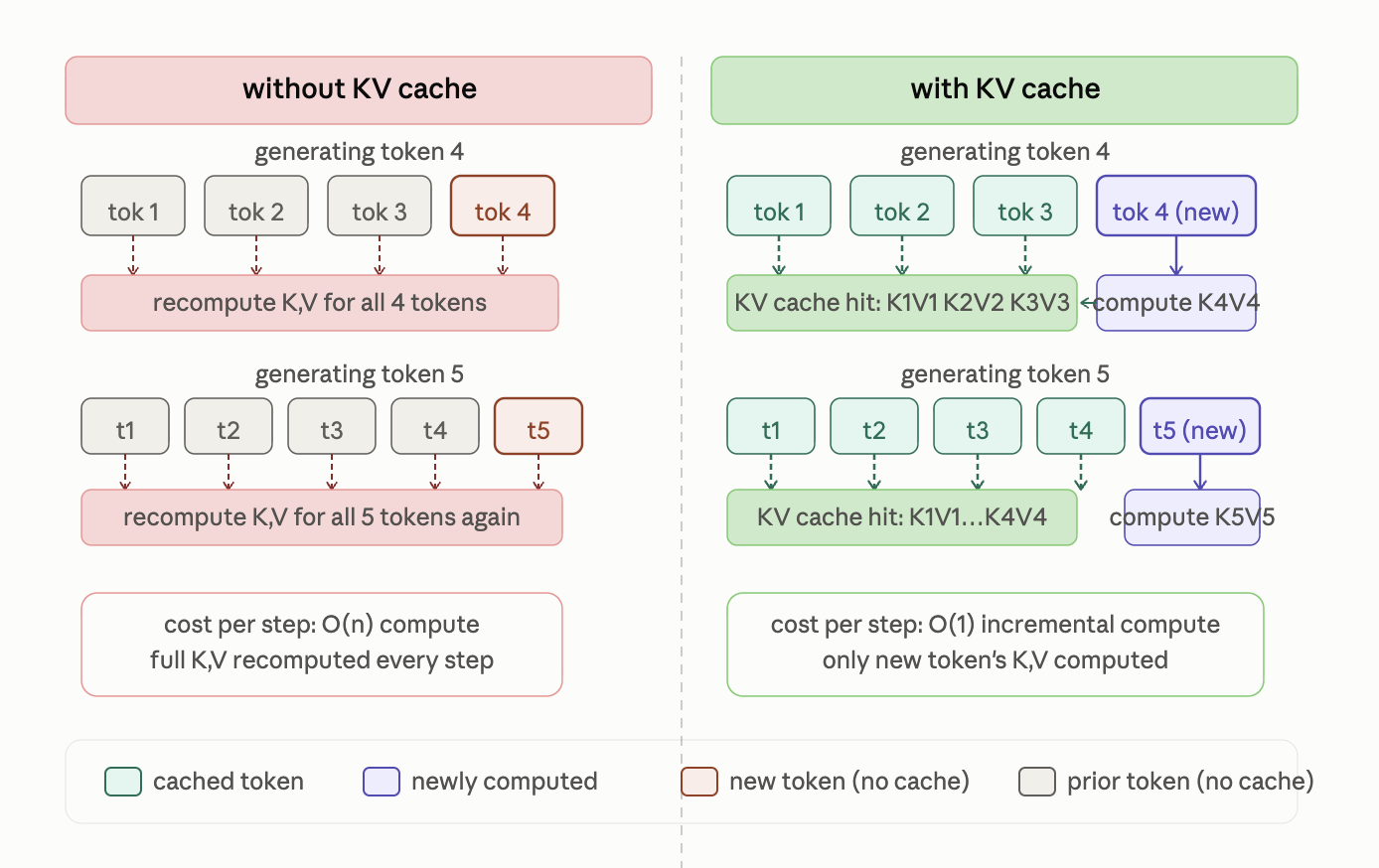
So the entire process becomes something like:
A new token arrives
→ compute its Query → look at cached Keys → use the corresponding cached Values → generate the next token
instead of repeatedly rebuilding the K/V information for the entire history.
If you have only 20 tokens, this might not sound like a huge deal. But if you have thousands or ten-thousands of tokens, this creates a huge difference!
Prefill vs Decode
This is where things usually start to feel a little confusing, because prefill and decode are very different at the hardware level.
During prefill, the model receives a large chunk of tokens, all at once. That gives the GPU plenty of work it can process in parallel, which is exactly the kind of job GPUs are great at! So even though a lot is happening, it can feel surprisingly fast.
On the other hand, decode works very differently. Here the model generates one token at a time. That means the amount of new computation per step is relatively very small, but the new token still needs to use all the K/V tensors we’ve cached so far. So, the bottleneck is different in the two phases. In many serving workloads, Prefill is compute-bound whereas decode is memory-bound!
A GPU is not just a huge computing engine. It also has to constantly move data between memory and the compute units. If that movement is slow, the GPU can end up waiting around even when it has plenty of compute available. Sometimes the problem isn’t doing the computation, but getting the data there fast enough.
And the KV cache is a great example of that!
But now we have a memory problem
The obvious reaction to all of this is:
Great. Just cache everything!
And that works, definitely! At least until you see how much memory that cache can start eating up.
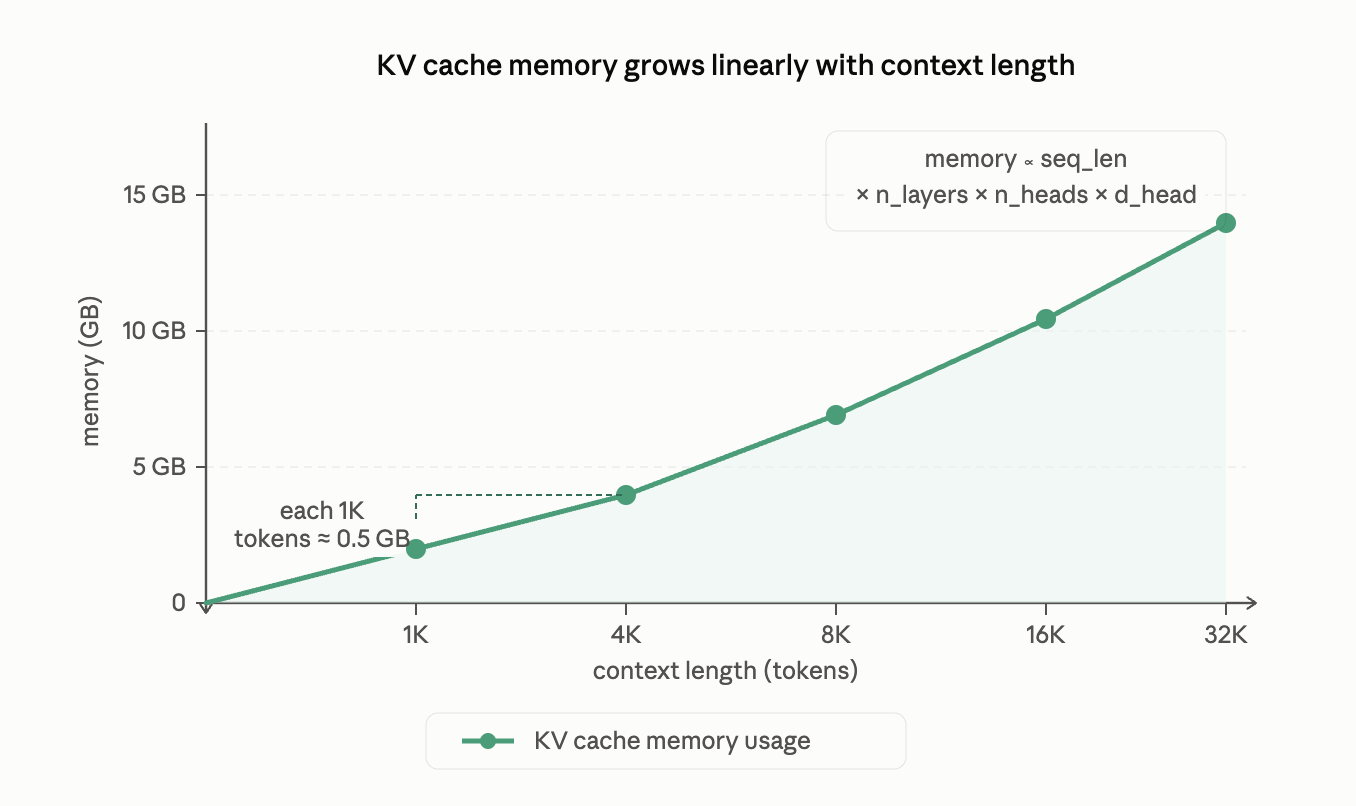
Every new token adds more K and V tensors to the cache. Then it stacks up really fast with every layer having its own K and V, every active request having its own separate context, and all of that grows enormously with the sequence length, the model design, the precision you store things in, and how many requests you're serving at the same time!
Woah, that sounds a lot! A simplified way to think about KV cache memory is:
$$ \text{KV Cache Size} = 2 \times L \times H_{KV} \times D \times S \times B \times P $$
where:
- 2 is because you store both Keys and Values
- L is the number of transformer layers
- Hₖᵥ is the number of key/value heads
- D is the size of each attention head
- S is the sequence length in tokens
- B is the number of concurrent requests, and
- P is the number of bytes used to store each value
The main thing here is to realise what happens when S and B go up. A longer context means a bigger cache, more users means a bigger cache. And in real systems, both usually increase together!
This is the point where serving an LLM stops being just a compute problem and starts becoming a memory management problem.
Let's understand this with an example
Let's take the model LLaMA-2-7B. It has 32 transformer layers, 32 attention heads, and a head dimension of 128. Since it uses standard Multi-Head Attention, we also have 32 K/V heads to store in the cache.
Using FP16, and a sequence of 4,096 tokens, the KV-cache for just one request is roughly:
$$ 2 \times 32 \times 32 \times 128 \times 4096 \times 2 = 2,147,483,648 \text{ bytes} \approx 2.15\text{ GB} $$
That's 2.15 GB just for the KV cache of one request! And of course, the model weights need memory too, along with activations, CUDA/runtime overhead, and everything else running on the GPU. So this means, a GPU cannot give all of its memory to the KV cache.
For reference, an NVIDIA H100 SXM comes with 80 GB of GPU memory.
I know that sounds huge at first. But once you start splitting it between model weights and several active requests, suddenly it does not feel that huge anymore. And this is where the problem gets interesting.
A model serving system is not just trying to figure out if the model can fit on the GPU. The real question becomes whether that GPU can keep a bunch of requests alive at the same time and still generate tokens smoothly.
That is a very different problem. The first is mostly about static capacity. The second is about real serving performance under load. And that is why KV-cache management starts becoming so important.
The original PagedAttention paper makes this point really well. Large KV caches that keep growing over time can become a serious bottleneck for batching and throughput.
Memory Fragmentation
For some time, many serving systems reserved one contiguous chunk of KV-cache memory for each request. Now, think about a busy server. One user sends a 200-token prompt; another sends 2,000 tokens. Someone else has a long conversation that keeps expanding.
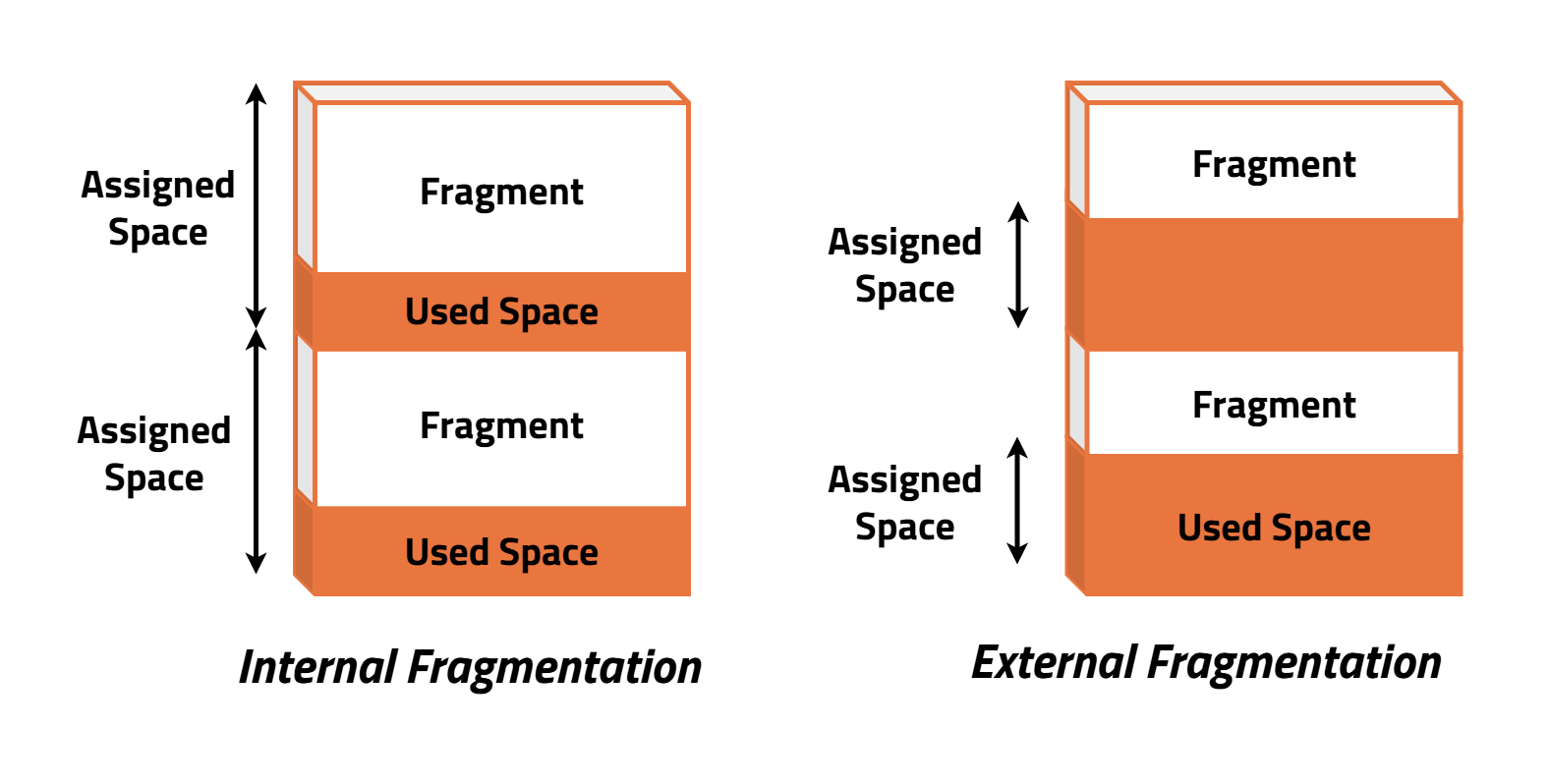
If we keep reserving big continuous chunks of GPU memory for requests like these, we end up wasting more memory than we might expect. That usually shows up in two ways.
Internal fragmentation
Internal fragmentation occurs when we reserve more memory than the request actually uses.
Say we reserve a lot of space for a maximum context of 4,096 tokens, but the request only uses 500. The rest of that space is still tied up. The memory is there, but it is just sitting unused.
External fragmentation
Now look at the same server over time. Requests come in, finish, and free up space in different places. After a while, the free memory gets scattered into smaller gaps. You may still have plenty of memory in total, but finding one large continuous block for a new request gets difficult.
If you have studied Operating Systems before, this part probably feels familiar. OSes have been dealing with the same kind of memory problem for a long time. Physical memory is limited, but programs keep asking for more memory as they run. Different pieces of data have different lifecyles. Some of it is short-lived, while some stick around for much longer. When all of this has to fit into one large contiguous space, things can get pretty messy.
The solution to this is paging. Instead of requiring a program’s memory to be stored in one continuous block, the OS breaks it into smaller, fixed-size pages. These pages can be placed anywhere in physical memory, and the page table keeps track of where each one is.
So, from the program’s point of view, memory still looks continuous, even though it might actually be scattered across physical memory. And this same idea turns out to be useful for PagedAttention too!
Paging the KV Cache
PagedAttention, introduced with vLLM, takes the same idea from OS paging and applies it to the KV cache. Instead of allocating one big continuous chunk of GPU memory for a request’s entire KV cache, PagedAttention breaks the cache into smaller blocks. These blocks can be placed anywhere there is enough free GPU memory. A block table keeps track of where each part of the sequence is stored.
So, even though the KV cache may be scattered across GPU memory, the model can still treat it as one continuous sequence. This makes memory allocation much more flexible and avoids wasting large chunks of GPU memory just because a request needs a different amount of space.
The original PagedAttention paper also reports very low KV-cache memory waste and significant throughput improvements compared with earlier serving systems, especially as sequence lengths and workloads increase.
Sharing the KV Cache
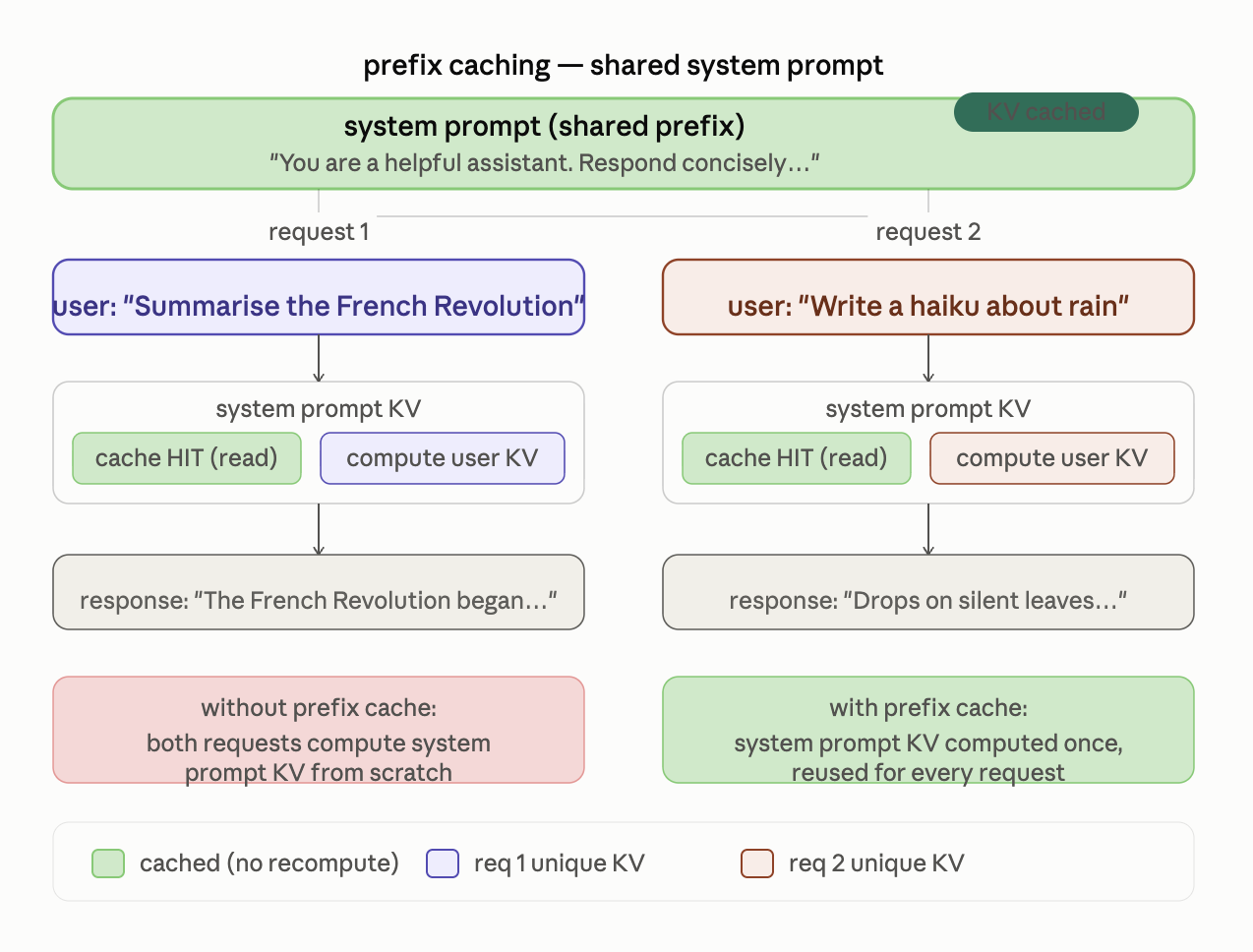
A nice thing about managing memory in blocks is that sharing becomes easier. Say multiple requests start with the exact same long system prompt. Why do we compute and store that same prefix again and again? With prefix caching, the KV state for that shared prefix can simply be reused across requests.
RAG + CacheBlend
RAG makes this a little more interesting. Imagine the same document getting retrieved for many different requests. The model has to process that document every time, even though it has already seen it before. So naturally, you’d want to cache its KV state.
The problem is that the KV representation of a piece of text can depend on the context around it. So you can’t always take a cached chunk and drop it into a different prompt and expect the same result.
That’s what CacheBlend tries to handle. It reuses the KV information that is still valid and recomputes the parts affected by the new context. The paper reports lower time-to-first-token (TTFT) and higher throughput than recomputing the full KV cache.
But wait, PagedAttention doesn’t make the KV cache smaller! It just manages the memory better. And once we fix the memory-management problem, the next question naturally becomes, can we reduce the cache itself?
Well yes! And that brings us to MQA and GQA.
MQA and GQA
In Multi-Head Attention, each Query head has a corresponding Key and Value head. So if a model has 32 attention heads, we have 32 sets of K and V in the KV cache.
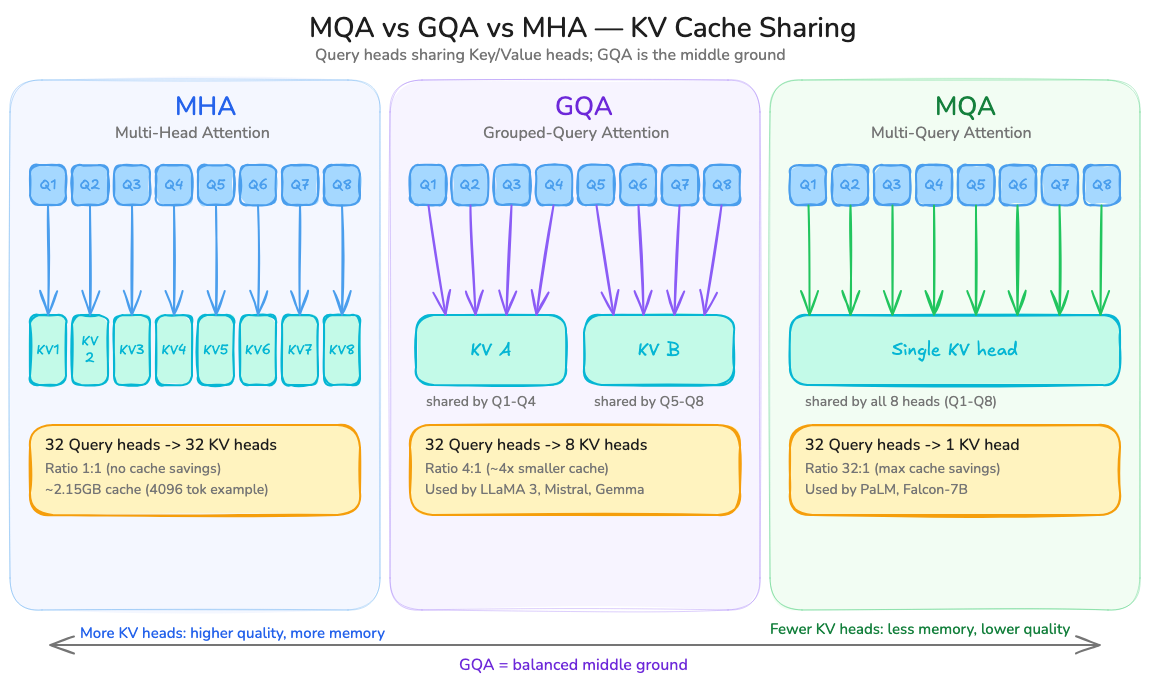
This is how Multi-Query Attention (MQA) is different. Instead of having a separate K/V head for every Query head, all the Query heads share the same K/V heads. So we still have 32 Query heads, but only one set of K/V to store. That’s a pretty big reduction in the KV cache!
However, Grouped-Query Attention (GQA) sits in the middle. The Query heads are split into groups, and the heads in each group share a K/V head. For example, 32 Query heads could share 8 K/V heads, with 4 Query heads using each one.
So MQA uses very few K/V heads, while GQA keeps more of them. You save memory without making all the Query heads share the same K/V. Llama 3 uses GQA in both its 8B and 70B models.
This is a nice example of a memory problem affecting the attention architecture itself.
What if we use fewer bits?
Another thing to look at is precision. If the KV cache is stored in FP16, each value takes 16 bits. If we use a lower-precision format, the cache takes less memory. That’s the basic idea behind KV-cache quantization.
There's a catch, though. Lower precision can obviously introduce errors, and using too little precision can hurt the model quality. So the question is, how much can we reduce the precision without affecting the model too much?
The idea comes back to the same question we started with:
If we’ve already done the work, why do it again?
The bottleneck
At this point, there’s more to worry about than just the KV cache. We have compute, memory capacity, memory bandwidth, latency, throughput, and GPU utilization, all affecting each other!
A GPU can have plenty of compute and still spend a lot of time moving data around. You can have enough memory and still waste it through poor allocation. And something that works well for one request might behave very differently when hundreds of requests arrive together.
So it’s not just about how fast the GPU is. It’s also about how well we’re using it.
There’s more than PagedAttention
It’s easy to look at PagedAttention and think, okay, GPU memory management is solved. But of course, it's not that simple.
PagedAttention solves an important part of the problem, but there are other ways to approach it. For example, vAttention looks at keeping a contiguous virtual layout while separating that from how the KV cache is actually allocated in physical memory.
The next time you send a long prompt to an LLM and wait for it to output the first token, there’s quite a bit happening under the hood. The model processes the input, builds the K/V representations, stores them in GPU memory, and then keeps reusing them as it generates each new token. For every new token, a new Query is created and used with the K/V tensors stored so far.
At the same time, the serving system is also managing the growing KV cache in GPU memory, deciding which requests can be batched together, and looking for work that can be reused. As a user, you type a prompt and an answer shows up just a few seconds later.
And once the cache starts growing, GPU memory starts becoming a problem too. How that memory is allocated and managed can have a huge impact on how efficiently an LLM can serve requests.
That’s what makes the KV cache interesting. A small optimization inside attention ends up connecting attention, GPU memory, operating systems, and inference systems all at once!
And that is where this story ends.